Showing posts with label Security. Show all posts

How to enable 2-step verification to Dropbox account

If you have been following news from the cloud industry, you might be familiar with the rescent exploits of Dropbox. It faced some inconvenience at the hands of hackers. From then, they have tightened the loopholes and implemented some security measures. Inspite of al these efforts, the safety of the user motsly lies in the hands of the users, since that's where a hacker seeking sensitive information will strike. It would be best to enable two step verification for your drop box account, so as to prevent un-authorized access to your private information.

With two-step verification you can save your private information and avoid inconveniences. Dropbox's 2-step verification works just like Google's one. It provides users with an extra security layer that can keep out most unauthorized activities.

Dropbox 2-step verification

Once you log into your account with your email and password, Dropbox sends a text message to your phone number. The text contains a 6-digit verification code which you gotta enter to log onto your drop-box account. You won't be able to log onto your account unless you enter the code.

Dropbox gives you the option of installing the Authenticator app on your smartphone, which generates time-sensitive codes right on your phone which can then be used to log in.

Process

1. To enable this two level security, visit dropbox account security page and scroll down to account sign-in section. You'll see the two step verification option there. Click on change, if it's disabled.


2. Now you can just follow the simple wizard which guides you through the process.

You can link you phone or your phone number which will receive confirmation codes for log in.

You will also be given an emergency code. Keep it safe and do not share it with anyone. This is for when you lose your mobile phone, and can't access the codes sent by Dropbox.

Step 1. Visit the security page once more and review all you linked devices. Un-link all the devices and re-link them. If you don't use a device any longer, then don't relink it. If you currently use a device, un-link and re-link it. That way, all the devices will now be set to require a 6-digit before a succesful login. If a new computer or device is used, you will be notified by email as well.

step 2. Update Dropbox on your device to latest version to ensure support for two-step verification.

Have a happy and safe browsing :D
Read More »

How to take Backup of Blogger template


Today I am going to explain you a simple article about the backup of template. Most of the people think that there is no need to take any backup of the template. For this reason I am going to explain you how to take backup of the template ? It is strongly recommend by me or most of the web developer that backup of the template is necessary whenever you are interested to edit it.

Why take backup of template:-

Suppose you don't know HTML, CSS or XML like languages and make some mistake in blogger template without any backup then it will provide a great hesitation to you because there is no way to recover that template again. So backup of the template is the only key to protect template from losses.


How to Take Backup of the Template:-

There are two methods to take backup of the template. We will discuss both two methods here.

Method 1:-

  1. Login to Blogger Dashboard.
  2. Go to Design / Edit HTML.
  3. Click "Download Full Template"


  1. Save file (.xml) in your local computer.

    How to restore template from Backup:-

    1. Click "Browse" button and open file saved in step 4.
    template
    1. Hit "upload" button.
    2. And finally you have done.

      Method 2:-

      Generally this is not a predefined method but this is preferred by most of the Web developer.
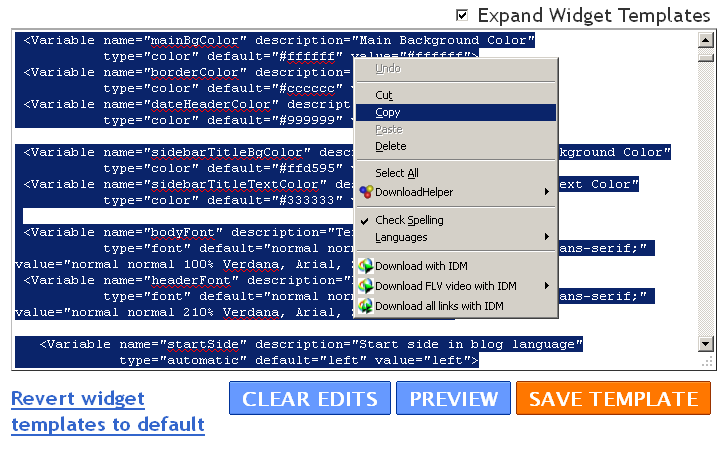
      1. Hit "Expand Widget Template".
      2. Select and copy the whole blogger template.
      copy
      1. And Paste the whole code in any text editor like notepad or wordpad.
      I think this article will definitely helpful for you. If you like the above article then don't forget to subscribe it for latest updates.
Read More »
 

© 2011. All Rights Reserved | Blogger Tricks 'N' Gadgets | Template by Blogger Widgets

Home | About | Top