Showing posts with label Gadgets. Show all posts

Acer Aspire S7 Specs, Pros and Cons

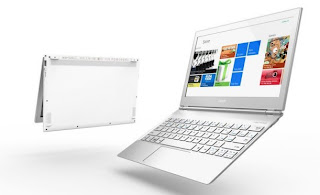
Acer Aspire S7

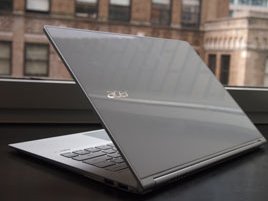
This is a wonderful mixture of high-tech hardware enclosed in an ultra-slim body which is fabricated out of toughened glass.
Pros

  • This has a premium built quality. It is light weighing around 1kg and this makes it easier to carry. It boots up in less than 12 secs. The 'Instant On' features ensures that it is powered as soon as you open the lid.
  • Acer Aspire S7 can almost handle anything. It can play FullHD videos, image editing in Photoshop, office work, web browsing, apps etc. It's multitouch display is receptive to taps and swipes, colors are bright and vivid, and text is rendered crisply.
  • The Acer Aspire S7 comes with an additional external battery pack that can be attached to its base. In normal usage, one can expect 9 hours of average work from both batteries.
  • The backlit keyboard with its three levels of brightness is quite helpful to work in dark environments.
Cons
  • The Core i7 processor in Acer Aspire S7 is overskill. Software that needs such processing power like gaming and image editing is sure to be undeserved by it's 11.6-inch screen. Similarly, its high resolution of 1920x1080 makes icons look miniscule and fonts unreadable on display. But users can opt for lower resolution for a clear view.
  • Though the speakers in S7 have the Dolby label, they are not that good.
  • The keys on the keyboard are very slightly raised, leaving little room for tactile feedback during touch typing, This affects the typing experience.
Specs
  • 11.6 inch, 1920x1080 resolution
  • 1.9GHz quad-core Intel Core i7-3517U
  • 4GB DDR3 RAM, 256 GB SSD
  • Wi-Fi, Bluetooth, 2xUSB 3.0 Ports
  • mini HDMI, 3.5mm Audio jack
  • Webcam - 720p HD, Dolby Stereo, Inbuilt Microphone
  • Windows 8
Read More »

Samsung 5 Series Specs, Pros and Cons

Samsung Series 5

The Samsung Series 5 (NP540u3C - A01IN) is a notebook with a screen that is large enough and a core i5 process. And, many of you might know, it has a touch screen which is great to use with Windows 8.

Pros
  • This one is well constructed. It boasts of a solid construction with a brushed metal look on its lid and around the keyboard. It has a tapering sharp edge at the front that contours on the side towards the screen to include USB, HDMI and LAN ports, a head phone jack and a card reader.
  • The laptop is very quick. From lid-up to login screen, it takes less than 15 seconds to boot up. Keys on the keyboard are evenly spaced.
  • This laptop can do everyday computer jobs like playing FullHD videos, apps, image editing, office productivity, web browsing etc.
  •  Sound from the internal stereo speakers is loud. The preloaded Sound Alive audio software offers a range of equalizer settings to enhance the experience.
  • This works for an average of 6 hours on single charge. You can toggle the touchpad and touchscreen on or off from the settings menu's option.
  • It's resolution (1366x768) is an ideal match to its screen (13.3-inch). Display is perfect, colors are vibrant and its touchscreen responds promptly and accurately to taps and swipes.
Cons
  • The screen of this Samsung Ultrabook is glossy. It retains fingerprints and stains and its reflectiveness effects visibility in bright environments. Most of the viewing angles are terrible. The display looks washed out if you watch it in any other position than looking straight in front.
  • This is too heavy weighing around 1.8kgs.
  • This premium notebook hasn't got a backlight for keyboard and it has just one USB 3.0 port and the other two are 2.0 versions.
Specs
  • 13.3-inch screen, 1366x768
  • 1.7GHz dual-core Intel core i5-3317U
  • 8GB DDR3 RAM, 24GB SSD, 500GB HDD
  • Wi-Fi, Bluetooth, 1x3.0USB port, 2x2.0 USB ports
  • HDMI, VGA, Ethernet, 3-in-1 card reader
  • Webcam - 720p HD, Stereo Speakers, Inbuilt microphone
  • Operating System - Windows 8
Read More »

Samsonite Torus Solar Backpack Review

Here I come with this Samsonite Torus Solar Backpack. It recharges your gadgets, carries your things and what more it does this with the help of a solar panel. Sounds cool, ain't it? The primary need of all modern gadgets is battery cause every portable gadget needs one. This Torus Solar backpack, as said, packs a solar charger to power up your gadgets on the move. So whether you are moving about the city or trekking, your gadgets in bag are always charger and ready.

Pros
  • The battery reservoir in this backpack works well and charges almost all handsets and cameras to at least 50%
  • This bag doesn't need to be facing sunlight all the time. As long as the prominent light source is sun, it'll keep charging, albeit at slower rate.
  • The charging unit is detachable, so if you're trekking, you can leave your bulky backpack at the camp while you travel with the solar pack to keep your gadgets charged.
Cons
  • The time taken to charge up the built-in battery is excruciating. Samsonite claims it takes 4 hours for a full charge, but it, more or less, takes 16 hours when outdoors.
  • The battery is too small to power-up laptops and high-end tabs fully.
  • Having slots for every type of gadget makes the Torus big and bulky. And the place left for other stuff is little. The solar charger is not light. So, you might end up having a heavy backpack that may not let you carry everything you need
Specs
  • Special slots for laptop, tablet, mobile, camera
  • Detachable solar panel zip pouch
  • 1600mAh battery
  • Connectors for micro USB and two other common pin sizes for laptops, phones and tabs
  • Made from 900D and 1680D polyester, lined with high-density polyester
Read More »

Protonixs Electropen Specs, Pros and Cons

Protonics has made device which converts your scribbles into an image and PDF file when you connect it to your computer. You can use this as your computer mouse even. This is an instrument that takes what you write and transforms it into a high-tech digitalizer. Pin the receiver onto the paper you are writing on, switch it on and you're ready to go.

Pros
  • When used with PC, this instrument can be used as a mouse, complete with a button to click.
  • The pen's battery is tremendous. It just goes on and on.
Cons
  • While you're using this, the only thing to be careful is to not have anything come between the pen and the receiver.
  • This device is not pressure sensitive. So you can't sketch using this device as a stylus.
  • The rechargeable base unit need to be recharged about every 8 hours of use.
  • This device doesn't work if you use wider or longer paper (than A4 sheet).
  • It is kind of weird to pin the base unit on a notebook, as it makes it irksome to turn pages. Also, when  you're done writing on a page, you have to press the On/Off button on the base unit to save the page. Not only does it disrupt your flow, but if you forget and start on the next page, you might lose your data or mix it up.
  • The bundled Note Manager software fails to turn handwriting to text. The point of this Electropen is to digitalize notes. But you still get your get your handwriting in an image file or PDF but not as editable digital text.
Specs
  • Ultrasound and Infrared connection
  • Works only with A4 sheets
  • Standard Refill (67mm long, 2.35 mm diameter)
  • About 8 hours of continuous writing with Receiver
  • About 30 hours of continuous writing with pen
  • 12gm
Read More »

Sony Smart Watch Specs, Pros and Cons

Sony's smart watch is a device that lets Android phone owners can use to check for missed calls, read messages and see social networking updates without taking their phone out.

Pros
  • Good build quality, the aluminum frame around the watch adds to the aesthetics in its design.
  • Setting this watch is very simple. Just install the smart Connect app from Android play store on your phone and pair it with the watch.
  • A whooping three day battery-life under normal use.
  • The smart watch comes in handy for geeks who jog or exercise. Using the Endomondo Sports Tracker, it allows a user to access info like distance covered, speed and location etc.
Cons
  • This watch has a poor screen with low resolution of 128x128 pixels and touch response is on the slower side.
  •  It uses mini apps which connect to main apps installed on your phone. Not many apps are available for this device. 
  • This watch depends on smartphone for its functionality and this limits the usefulness of this watch.
Specs
  • 120Mhz ARM CPU
  • 128KB RAM
  • 1MB flash storage
  • Bluetooth3.0
  • 1.3inch capacitive touchscreen, 128x128 pixels resolution
  • 110mAh battery
Read More »

Epson Moverio BT100 Specs, Pros and Cons

Epson Moverio BT100 is a futuristic device. Wear this and you're bound to grab eyeballs. This device makes you look like a blind man from future. This gadget is a personal entertainment system  on which you can watch movies, browse the net and a lot more. The wired glasses become your display. The base unit is Wi-Fi capable and has a rechargeable battery, storage, memory slots, track pad and directional buttons for navigation. You can even watch 3D content.

Pros
  • This unit plays FullHD 1080p videos and its Dolby-enhanced sound make for clear audio. It plays 3D content well.
  • Although you're viewing a micro-projection LCD, the perceived image is close to the 80 inches that Epson states in its spec sheet.
  • Transferring content to the device and navigating through its user interface is simple.
  • The headset and the base unit are sturdily built. BT100 comes with a durable protective case and this makes it easier to carry.
Cons
  •  This device can't play MKV format.
  • Surfing internet using its touchpad and directional keys is a bit troublesome.
  • The battery life of this device which is around 4 to 5 hours is inadequate.
  • This device runs on Android but there's no Play Store. You can copy APK's applications onto a memory card and use them though. But it's a long and roundabout process.
  • It is heavy. Wear the headset for an hour and you start feeling the weight on your nose. You cannot move your head freely for fear of the unit falling off.
Specs

Headset
  • 16:9, 0.52-inch  poly-silicon TFT Active Matrix Color LCD
  • 960x540 pixels, 24-bit color
  • Removable lens shade for privacy
  • Dolby mobile, 1.5MW sound output (2.5mm Mono x 2)
  • 3.5mm headphone jack
  • 240grams
Controller
  • Capacitive single touch track pad, individual navigation buttons
  • Android 2.2
  • 1GB internal memory, supports microSD (2GB max) and microSDHC (32GB max)
  • micro USB, Wi-Fi
  • Lithium polymer 2530mAh
  • 165grams
Read More »

Samsung Galaxy Camera Review and Specs

Samsung, one of the leading electronic devices' manufacturer, has now come up with a new camera and its called Samsung Galaxy Camera. This camera runs on Android 4.1 Jelly Bean Operating System with 3G and 4G connectivity. And this means that users can share their photos or videos to any social media from the camera itself without uploading them to a PC and then share it. You can share any of the recorded videos or captured photos to any Wi-Fi connected device.
This camera sports a 4.8-inch HD LCD touchscreen and that makes it easier to use. You can easily switch to any mode, go through the pictures, edit photos and a lot which makes photography fun.


Coming to the camera's hardware, it has got a 16.3M image sensor and a 21x optical zoom. As said, it has a 4.8-inch (121.2mm) HD LCD touchscreen. It has a Voice Control. Sounds cool, ain't it? It can record fullHD 1080p videos in AVI, MP4/3GP, WMV, FLV, MKV, WEBM formats and audios in MP3, AAC, AMR, WMA, OGG, FLAC, 3GA/M4A and WAV and has a video frame rate of 30 fps. You can use applications like Instagram, Paperartist, dropbox, Gallery, Photo Wizard, Video Editor, AllShare Play, S-Suggest, S-Voice and a other Samsung apps. It has got a huge battery stand by time up to 280hours (3G).

This phone, as said, can run applications like Instagram, which makes photo sharing easy. Photo editing is made easy by apps like Photo Wizard and video editing on the go can be done with Video Editor. So, while you're on a vacation, and you wanna edit your pictures, there is no need of a laptop, you can just fo it with your camera. And the cool feature is that you can backup your photos in Cloud automatically. Plus, it allows you to access Google Search, Google Maps, Gmail, Google Latitude, Google Play Store, Google Plus, YouTube, G-talk, Google Local, Google Navigation, Google Downloads, Google Chrome Browser, Google Play Books and Google Play Movies

Coming to the Capture and Recording features, I can say that this gadget has got 'em all. You have an option called Smart Pro Mode. If you select this mode, you are presented with various special modes (we can even say weird modes) like, waterfall trave, through which you can take a perfect picture of a waterfall, Light trace, which allows you to capture the red tail lights and white headlights of cars on road, Action freeze, that allows you to capture high-speed scenes and a lot of modes. Coming to the videos, it has got a worth-a-discuss feature called Slow Motion Video which allows you to capture a video and then plays the video in slow motion. It captures your videos at an amazing 120 frames per second and 720x480 resolution and ,as said, plays them back slowly. It has other modes like sunset, panormaa, including burst, macro and 15 other impressive modes.

This phone packs in a 1,4GHz quad core Exynos processor. The camera has 8GB storage in-built and can accept microSD cards up to 64GB. It has a 1,650mAh battery. This device make photography fun and brings out the professional photographer in you.

Specs

  • 16.3MP BSI-CMOS 1/2.3" sensor
  • 1.4GHz Exynos 4412 Quad-core processor
  • 21x optical zoom 23-481mm
  • 4.8inch HD Super Clear Touch Display
  • Full HD Video recording at 30fps, 720p 120fps
  • ISO range - 100-3200
  • Android 4.1 Jelly Bean
  • 8GB internal storage, 1GB RAM, microSD up to 64GB
  • GPS with A-GPS and GLONASS
  • HSPDA, 21 MBPS, HSUPA, 5.7MBPS
  • 128.7 x 70.8x19.2mm
  • 300g
  • Li-ion 1650mAh battery

Read More »

Foxconn Nano PC Specs, Pros and Cons

Foxconn Nano PC

Pros
  • With a Sleek, brushed metal black chasiss and only a little blue little LED to indicate it's on. This one looks classy. Plus the package includes a cool stand.
  • Four USB ports at the back, two more USB 3.0 ports at the front, built-in Wi-Fi and a memory card reader the nano PC has the best connectivity.
  • The back also include a DVI port and audio out, letting you connect it to a standard monitor and PC Speakers.

Cons
  • With no preloaded operating system, the Nano PC either needs you to install a fresh version off Windows or some other OS on it. This is a huge hassle for non-techie users who are looking for a simple ready to go machine to turn into a Smart TV.
  • The size apparently comes at the cost of performance. This cannot handle FullHD MKV videos at all. Games, too, were a no-go with the Nano PC. Using Windows 7 was a sluggish and unsatisfactory experience. Linux Ubuntu runs very well but it also struggles with the remote control.
  • The Nano PC doesn't come with a remote control, keyboard, mouse, webcam. It's just a barebones PC, so you will be spending more on all of these accessories, to say nothing of a Windows license.
Specs
  • 1GHz dual core AMD C70 processor
  • AMD Radeon HD 7290 graphics
  • 2GB RAM, 250GB HDD (+4GB USB flash drive bundled)
  • 4x USB 2.0, 2xUSB 3.0 (front), 3.5mm audio (front and back)
  • 3.5mm audio in, HDMI, DVI, 5-in-1 memory card reader
  • Built-in Wi-fi, Ethernet Port
  • 190x135x38 mm
Read More »

Zotac Zbox Nano XS AD11 Specs, Pros and Cons

Zotac Zbox Nano XS AD11 will make your dreams of having a Smart TV come true. Yeah, its true. So here I go with Pros, Cons and Specs.

Pros
  • It's tiny! No really, you have to see it to realize how tiny it is. It's a 4x4 inch gizmo about 2 inches in height. And all these make the Zbox Nano XS AD11 a pretty nifty looking gadget.
  • But the size is not only the best thing. It is a full PC that can take anything you throw at it. Add a keyboard and mouse and you can even use it as a desktop. It boots up quickly and runs Windows 7 smoothly. Heavy-duty gaming or image editing does slow it down to a crawl, but it managed to play some new games on medium to low settings without stuttering.
  • Zotac has bundled a Window Media Center remote control as well as a webcam for Skype calls.
Cons
  • The lack of preloaded operating system is a huge problem. The Zbox Nano starts seeming a little overpriced when you add the cost of a Windows license. If you're loading up a free operating system like Linux Ubuntu, setting up the remote control isn't easy for an average user.
  • make no mistake about it, the XS AD11 is a full-fledged but what's a PC without mouse and a keyboard. Those are additional costs again. And you'll ideally want wireless variants of both.
  • The four USB ports at the back quickly get used up by a keyboard, mouse, Wi-Fi dongle and Webcam, leaving only the eSATA/USB combo port at the front. Too little.
  • The Media center remote only makes sense if you have Windows installed, which is the worst part about the XS AD11.
Specs
  • 1.65GHz dual-core AMD E450 processor
  • AMD Radeon HD 6320 graphics
  • 2GB RAM, 64GB mSATA SSD
  • 2X USB 2.0, 2X USB 3.0, eSATA /USB 2.0 combo
  • 3.5mm audio in, HDMI, 6-in-1 memory card reader
  • Wi-Fi dongle, Ethernet port
  • 106x106x37mm
Read More »

Akai Smart Box Pros, Cons and Specs

Wanna have a smart TV but cannot afford it? Don't worry cause here's Akai Smart Box to do that for you. Just connect it and you can turn your TV into a smart TV. Amazing, ain't it? So lets start with Pros and Cons.

Pros
  • The wireless mouse which comes along with the box is the best. Well, there's gotta be one for these devices. For a TC with Smart TV with a operating system, its ridiculous not to have a mouse.The right click becomes a shortcut for 'Back' in Android, making the interface easier to navigate.
  • Akai's smart box sports a custom interface. And while it isn't great to look at, its UI with shortcut categories such as media games etc actually makes a sense. It provides quick access to the right app and gels with Android just well enough to be intuitive without sacrificing functionality.


Cons
  • Preloaded run like charm and this covers office apps, media players, social networking and some games. But downloaded apps work disastrously. Most of the apps crash very often.
  • While FullHD AVI videos played well, the device struggles with MKV movies in FullHD  (though 720p HD MKV files ran smoothly). Also there seems to be an old yellow tingle to all the videos played through the smart box and this is most noticeable with animated films.
  • Mouse, which comes with this device, isn't as convenient as a remote when you're watching videos on TV, but that's a small sacrifice.
Specs
  • 1.2 GHz ARM Processor
  • 1GB RAM
  • 4GB Flash memory, SD card slot (up to 32 GB)
  • 4X USB 2.0, 3.5mm audio in, HDMI, Composite AV port
  • Buikt-in Wi-Fi, Ethernet Port
  • 155X120X30mm
  • Android 2.3 Gingerbread
Read More »

Nokia 360 Portable Speaker Review

Nokia 360
This supports Near Field Communication (NFC) letting you pair Nokia NFC- enabled handsets with it by merely touching both devices together. This works with Bluetooth, and carries an aux Line-In to connect MP3 players. Battery life is monstrous. Coming to output, this is not that loud. Acoustic and classic tones seem warmer and bass is more pronounced. The coolest thing is that two of these can be paired together wirelessly to create true stereo sound.Still, Even a single unit works wonderfully. But when it comes to price, its a bit costly. It hasn't got a microphone to attend calls.

Specs
  •  Frequency Response - 20hz - 20kHz
  • Sensitivity - 80db
  • Rechargeable, Replaceable Battery, approximate battery life 21 hours
  • Optional Power Supply - USB Power Cord
  • Output Power - 2.1W
  • 3.5mm auxiliary input
  • 514grams
Read More »

Portable Speaker about the size of a Bar of a Soap!!

F&D M8

This one is small and has flat speakers. To be exact, its about the size of a bar of a soap and this makes it really easy to carry. This also has a microphone. So, you can answer calls whenever your phone is connected to it wirelessly. It has all bases covered to make it for a great smartphone accessory. The speakers sounds slightly louder. There's an underlying audible hiss and a notable absence of bass. Overall, its quite disappointing.


Specs
  • Frequency Response - 100Hz - 20kHz
  • Sensitivity - 65db
  • Rechargeable, Replaceable batter
  • Optional Power Supply - USB Charging Cable
  • Output Power - 1.2W
  • 3.5mm auxiliary input
  • Microphone for attending calls
  • 320grams
Read More »

Portable Speaker from JBL

JBL Fip
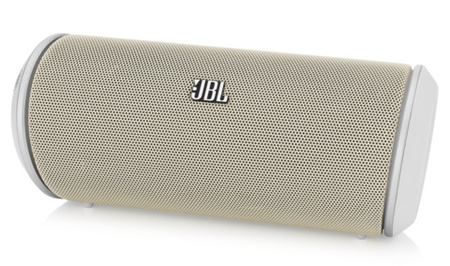
This is the, honestly, the best portable Bluetooth speaker. The sound output is at its best. It looks perfect. Wonderful build quality. This device is primarily is cylindrical in shape, but tapering at the back to prevent it from rolling off your table. Anyways, you can use it as you like, flat like a soundbar or standing in a column. Call quality is sterling and audio is crisp. It's speaker is made of metal grill.
Coming to output, it's loud and rich. Vocals sound clean. This never disappoints at any volume levels and genres like rock, classic, pop etc.. Besides its cheap.


Specs
  • Frequency Response - 150Hz - 20kHz
  • Sensitivity - 80db
  •  Built-in Rechargeable battery, approximate battery life 5 hours
  • Optional Power Supply - AC Adaptor
  • Output Power - 2x5W
  • 3.5 auxiliary output
  • Microphone for calling
Read More »

Wireless Speakers for your Mobile Phone

Creative D80
This is a device from a n altogether different generation of Bluetooth speakers. This speaker almost weighs a kilogram. It has no rechargeable battery. It doesn't come with a microphone. So, you cannot attend a call through this speaker. But wait, this doesn't mean that this is not a proper one to use. It delivers sound that is loud enough to fill a medium-sized room. It works wonderfully even the volume is at its peak. High and mid-range level sounds sharp, and the bass levels are deep.
This is not exactly top-notch speaker. It needs a power source at hand. So, it is unfit for outdoor use. But its quite suitable to a hostel room or a kid's bedroom.


Specs
  • Frequency Response - 20Hz - 20kHz
  • Sensitivity - 80db
  • Power Supply - Power Cord (No optional power supply)
  • 3.5mm auxiliary input 
  • 1.06 Kg
Read More »

Portable Speakers for your Smart-phone

Logitech Mini Boombox
This is an always-ready sort of pocket speaker. Pair it once and it eagerly latches on every time you connect via Bluetooth. This connects quickly. Just switch it on and it goes into the pairing mode, indicated by a flashing blue light under the metal grill. It has a glossy top, illuminated by red lights, displaying a touch-sensitive panel with controls to wirelessly pause what's playing on your phone, replay the previous track or play the next song. The volume control and touch function lets you answer call through the speaker's bulit-in microphone. Its glossy panel tends to accumulate fingerprints. It looks cute, though. Speaker performs wonderfully with loud output which is enough to fill a small or medium sized room.
Bass lines are rendered with a discernable thump that's surprising for a speaker of that size.It plays acoustic and classical music well. Phone calls are clear. Microphone works properly. Last but not the least, its build quality is good. It doesn't come with travel pouch, though.


Specs
  • Frequency response - 200hz to 15hz
  • Sensitivity - 75db
  • Built-in rechargeable battery, approximate battery life 5 hours
  • Optional Power Supply - USB Charging Cable
  • Output - 2x3W
  • 3.5mm auxiliary input
  • Microphone for calls
  • 230grams
Read More »

Nikon S800 Coolpix Review

The Nikon Coolpix S800C is a camera running on Android. You might think "What? Camera running on Android!!" But yeah its true, it has a 16mp sensor and 10x optical zoom. It runs on Android 2.3 Gingerbread. Switch it on and you are prompted to connect Wi-Fi with its built-in receiver and set up the device with a Google account. The camera latches on to wireless connections easily, and just like that, you're ready to go. Email, Browsing, Social networking work smoothly, and the play store lets you download Android apps. It has 1.7GB internal memory. Games like Angry Birds and Subway Surfer works flawlessly. Its 3.5 inch touchscreen responds promptly to taps and swipes. But 3D games like Dead Trigger crashes now and then.

Well, it has a 16MP sensor and 10x optical zoom, the cameras output is on par with similar shooters. Videos shot are in FullHD with stereo sound, colors look realistic and pictures are sharp. When compared with the superzooms, the photo output is almost identical. So the now choice is between greater optical zoom. Still, the S800c is not about the camera alone. It's a device that needs to be judged along with the apps that it lets you run. With Android, users find it easy to build their own camera by choosing from a wide array of photo apps. With Instagram and Pixlr-o-matic on the shooter, we could click a photo, apply effects, and even upload it to the internet if there was a Wi-Fi connection at hand. Images after that kind of digital processing look fantastic despite the apps processing lower-res downscaled images.

On the other hand, lack of 3G capability can be frustrating because you have to wait till you're in a Wi-Fi zone to share your videos and pics with your friends and family. The camera's battery life isn't good. This S800c has a CIPA rating of 140shots per charge. And this is excluding the web browsing and apps. So, you can expect no more than 80 shots per charge if you wanna surf internet and use camera simultaneously.

Overall, the Nikon S800c is a decent first attempt at merging a smart OS with proper camera hardware. The true capability of this sort of camera will be realized when developers start developing apps that can process large size images and take advantage of the superior optics and image processors. Still, when coupled with today's apps, the S800c is capable of better pictures than most of the cameras.

Specs
  • 16 MP CMOS Sensor
  • Expeed C2 processor
  • 10X Nikkor Optical lens
  • f/3.2-5.8
  • ISO up to 3200
  • Image stabilization, Panorama mode, Face detection
  • 1080p FullHD video recording
  • 3.5inch OLED touchscreen
  • 1.7GB internal memory, SD memory card slot
  • Wi-Fi, GPS, HDMI USB 3.0
  • 1050mAh Li-ion battery, average 40-50 shots with browsing and app use
  • Android 2.3 Gingerbread
Read More »

Upcoming Gadgets with Windows 8

Surface


Touted as the flagship device for Win 8, this hybrid tablet/PC has been designed by Microsoft Surface sports a sleek design, with a hinge at the pops out to prop the tablet on a table. It can also be paired with a cover that doubles up as a keyboard with touch buttons.

Specs
  • 10.6 inch screen (1366x768)
  • 1.4GHz quad-core Tegra 3 CPU
  • 2GB RAM
  • 32GB/64GB storage
  • Front and Back 720p HD cameras
  • Wi-Fi, Bluetooth-4
  • 2X USB 2.0, microSD card slots
  • Up to 8 hours battery life

Dell XPS One 27
This all-in-one computer from Dell comes with a touchscreen, which makes it a perfect companion to Windows 8. The XPS one 27 is not the Windows all-in-one, but is one of the first. Dell has gone all out with the top notch components, making it a very powerful computer despite its sleek and slim design.


Specs
  • 27-inch Touchscreen (2560x1440)
  • Intel Core i7 quad-core processor
  • Up to 16GB RAM
  • Up to 2TB HDD
  • Nvidia GEForce GT 640M Graphics
  • DVD-RW or Blu-Ray drive
  • Wi-Fi, Bluetooth
  • 6x USB 3.0, Ethernet Ports, multi-format card readers

Read More »

Samsung Galaxy Note II

Well, its been so long that I haven't posted anything, so here I'm, back with Samsung Galaxy Note II. Its Bigger, its better, its smarter (being a smart phone its gotta be). With the original Note. Samsung introduced a whole new category of devices called phablets which are , obviously, larger then phones and smaller than tablets. The Note II packs in better hardware, well we can say its top-notch, and a slightly bigger screen in a slimmer profile. It has, like the previous one, plastic and faux metal finish that has become Samsung's signature. Coming to its size, people with small hands might find the Note II slightly unwieldy to attend calls unless they pair it with  Bluetooth headset.
 On the other hand, its large display allows for a better user experience. The Note II sports a bright touch screen with fantastic response and is capable of displaying vivid colors. Top-notch hardware handles FullHD movies, multitasking and anything else you want it to do. The speakers are loud, playback is clear and the call quality is not at its peak, there's a slight defect. But the real star in the Note II is its improved stylus - The S Pen - that feels responsive and its effortless to use.

Here comes the signature part of the Note series. With the bundled S Note apps, jotting down memos, annotating images with text, and even sketching seems more natural. And it converts hand-written notes into text.

The other highlight is the split-window mode. This allows users to work in two windows simultaneously - a real boon given the expansive screen. Still, split-windows is only supported by few apps such as Youtube, Gmail and the web browser. When it comes to the cameras, day-time pictures taken with the main shooter are sharp and detailed though in low light, some grain creeps in. FullHD 1080p videos, shot with the device. - though not as good as the still pictures - are bright and clear. The front camera works well during video chats.

GPS in this device locks within seconds and is accurate. The battery life is very good, lasting for 14 hours of heavy use (photography, gaming, Youtube, internet browsing on a 3G connection) and 22 hours of regular use. While there isn't anything wrong with the Note II, it's worth its price only if you need its stylus and big screen. Phones like the HTC One X or the Galazy S3 are cheaper and easy to handle. Similarly if you want a very big screen, the iPad or a 7 inch tablet Galaxy Tab 310 are arguably better deals.

Indeed, the appeal on the Note II lies in its integration of smartphone portability, stylus functionally and a larger-than-normal screen. It's the perfect device for people who find smartphones too limiting and tablets too big. If you fall in this category, you can't go wrong with Note II.

For Pros, Cons and Specs Click Here.
Read More »

Samsung Galaxy Note II Specs, Pros and Cons

Well, I think no intro is required as I've already posted about this phone. You can read it here.

Pros
  • Big screen and responsive one. The S pen works wonderfully. It does multi-tasking without a flaw. Hardware's top-notch, Speakers are perfect.
  • The camera's perfect. FullHD 1080p shot with it are clear and bright. Well battery life's huge, lasts for 22 hours (regular use). It lasts for 14 hours if you play games, browse internet etc.
  • Its split-window feature is at its best.
Cons
  • The building quality is  poor. It doesn't fell premium. Its too big for people with small hands. They'll find it difficult to answer calls unless they you use bluetooth hanadset.
  • The split-window feature supports only a few apps and browser. The call quality is not at its best.
Specs
  • 5.5 inch Super AMOLED touchscreen (1280x720)
  • GSM, 3G, Wi-Fi, Bluetooth
  • 1.6GHz quad-core processor
  • 2GB RAM
  • 16GB internal memory, microSD card up to 64GB
  • 8MP camera with autofocus, flash, 1080p FullHD video
  • 1.9MP front camera with 720p HD video
  • 3100mAH battery that lasts over 22 hours of average usage
  • Android 4.1 Jelly Bean, Touchwiz UI
Read More »
 

© 2011. All Rights Reserved | Blogger Tricks 'N' Gadgets | Template by Blogger Widgets

Home | About | Top ▲