Showing posts with label mobile phones. Show all posts

HTC 8X Review, Specs, Pros and Cons

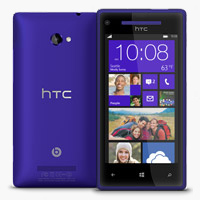
Here comes another device that you would love to have. Its the HTC 8X. Well, starting with the operating system, it runs on Windows Phone 8 (WP8). The WP 8 is a work of art and this device is a perfect representation of what Microsoft is bringing to that market with its updated mobile OS. Just like the previous versions WP 8, looks beautiful using simple fonts and lines to create a simple 2D user interface that's defined by lots of square boxes that Microsoft call tiles. These so called tiles, which replace icons, are much bigger and can also display nuggets of information. For example, the Mail tile can show number of unread emails.

This one scores on design, both in hardware and software. Windows 8 is a beautiful and intuitive for people who didn't use smartphones and are using them for the first time. For Windows 8 PC users, this handset will offer tight integration especially with cloud services like SkyDrive, the People app, etc. If you're looking for a phone with great camera, this is definitely not it. The app store doesn't compare to that of iOS or Android. Power users will be unsatisfied with the lack of robust notification system and proper multitasking. Overall, this phone falls short of comparably priced phones like Samsung Galaxy S III or the HTC One X.
Pros
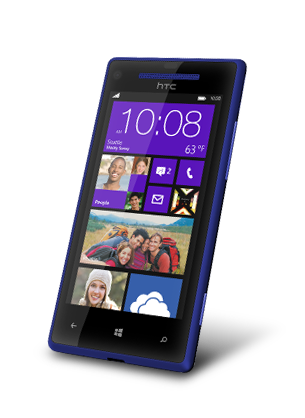
  • This is a stylish handset. The most beautiful part about this phone is its tapered edges. This makes it look slimmer than it actually is. Build quality is top class and the phone feels premium.
  • The 2.1MP front cam has an ultra-wide lens. If you video chat very often, you will love how much it can accommodate in its scope.
  • WP8 is fast. There is no lag when you open apps or fire up the camera. Web-browsing is smooth, Maps app, for which Microsoft is using Nokia's data in India, is detailed and covers all well-known areas.
  • The design and interface in WP8 is unique and beautiful. It is also quite intuitive and apps like Mail, SMS or People (contacts) are easy to use.
Cons
  • While WP 8 is a define improvement over WP 7.5, in many ways it remains the same old OS. It still lacks a proper multitasking system. 
  • The apps, barring a few like Music and SkyDrive, don't run in the background. In WP 8 apps are suspended. In other words, they are paused. For apps like Rowi, which are supposed to run continuously to keep you updated with tweets, it doesn't work.
  • There is no proper notification center in WP 8. The home screen is limited to show notifications from six apps - and to see or clear these notifications, user has to go into those respective apps.
  • Only handful of apps and games when compared to those available on iPhone or high-end Android phones.
  • The battery life is average. On 3G, the phone lasts for around 9 to 10 hours when used for making an hour call, some gaming, email, Twitter and some photography.
  • The primary shooter is below average. The pictures captured through 8X had excessive smoothening and lack details.
Specs
  • 4.3-inch SLCD-2 Screen
  • 1280x720 pixels, 342 ppi
  • 1.5 GHz dual-core CPU, 1GB RAM, Micro USB v2.0
  • 2.1 MP front cam, 1080p FullHD video, 8MP primary cam, 1080p FullHD video
  • GPS, A-GPS, Bluetooth v3.1, 3G, Wi-Fi, NFC
  • Micro-sim, No microSD card slot
  • 1800mAh battery, 9-10 hours of average usage
  • Windows 8
Read More »

Motorola Razr Maxx Specs, Pros and Cons

The Motorola Razr Maxx has got a huge battery which goes on and on. If you need a phone that packs a whopper of a battery, then look no further. But you gotta compromise few things.

Pros

1. With numerous phone calls, 3G usage, camera work and gaming, the Razr Maxx still lasts for a day and half. On an average usage, the handset needs to be charged every second night, making it the best battery ever seen on a smartphone.
2. Good color reproduction and a fast shutter speed will please shutterbugs. And the camera shines in video capture too. Recording FullHD videos smoothly and with good audio reproduction. It has got a waterproof back even.
3. Packed with top-notch hardware, the Maxx manages everything easily. From multi-tasking to HD video recording it can do everything. Multi-tasking is particularly  impressive, showing no lag eve when switching casual gaming to maps to 3D games.
Cons

1. The moment you look at its screen, you know something's wrong. The colors look saturated and seem to bleed a bit, especially noticeable in graphics-heavy games. Additionally, the touch response is erratic too. For a device of its class, the screen could be a deal-breaker for many.
2. Hold the phone in landscape mode and you can feel the material giving way, making it feel flimsy. Besides, the hardware heats up a lot. The back is waterproof, which is a great plus point, but in regular usage, it can become too hot to hold. Also, before the Maxx, we had never felt the heat transfer to the touch screen of a smartphone.
3. There is nothing to like about the custom MotoBlur UI. Where stock Android Ice Cream Sandwich is sleek, Moto UI is clunky and Where Ice Cream Sandwich is classy, Moto UI seems garish.


Specs
  • 4.3 inch super AMOLED capacitive touchscreen (950x540 pixels)
  • 1.2 GHz dual-core processor
  • 1 GB RAM
  • 16 GB internal memory, expandable up to 32GB via microSD
  • 8 Megapixel rear camera with autofocus, LED flash, 1080p FullHD video recording
  • 1.3 MP front camera with 720p HD video recording
  • 3G, Wi-Fi, Bluetooth, micro USB
  • 3300mAh battery lasts two days on average usage
  • Android 4 Ice Cream Sandwich, MotorBlur UI
Read More »

Sony Xperia Go Specs, Pros and Cons

The Sony Xperia Go is one good-looking gizmo and it's build to endure too. It is waterproof, can handle bumps and falls, and even shrugs of dust! Fantastic if you love the outdoors or you are careless with your phone.

Pros

1. This one is meant to be tough phone. You throw it in a bucket of water, leave it out in rain, allow it to slip off your hands, that doesn't hurt it. It is tough indeed.
2. Usually, tough phones look hideous. But this one is a beauty. Sony has created a sleek gadget that fits comfortably in the hand. This device is light.
3. Its dual-core processor and the optimized TimeSpace user interface translate into smooth performance. There is no lag at all, regardless of what you choose to do on the device, whether you are gaming or zooming in and out of maps, scrolling webpage etc.

Cons

1. While colors are rendered properly, the screen resolution is a big problem. It is simple too low for a phone that costs more than Rs. 15,000. The text also doesn't look sharp. This affects the user expereince.
2. The camera is disappointing. Pictures and videos shot with this device lack details when compared to output of other mid-range phones. There is no front camera, so the device can't be used for video chats - a feature that is now available on phones half its price.
3. The battery life is average, lasting around 9 hours on a 3G connection when used for emails, Twitter, web browsing, some photography and around half an hour of gaming. It's not bad, but it's insufficient for a full day of average usage. The Xperia will go hiking with you, but whats the use if its switched off....!


Specs
  • 3.5-inch capacitive touchscreen (480x320 pixels)
  • Shock, Dust and Waterproof (up to 1 metre for 30 minutes)
  • 1GHz dual-core processor
  • 512 MB RAM
  • 8 GB internal memory, expandable up to 32 GB via microSD
  • 5-Megapixel rear camera with autofocus, LED flash, 720p HD video recording
  • 3G, Wi-Fi, Bluetooth, micro USB
  • 1305mAh battery that lasts around 9-10 hours of average usage
  • Android 2.3 Gingerbread, TimeSpace UI
Read More »

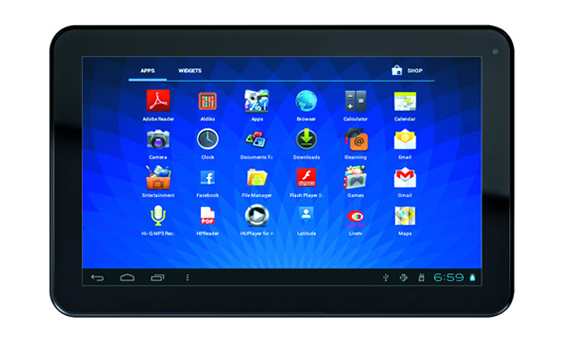
Micromax Funbook Pro Specs, Pros and Cons

Intro
The Funbook Pro is for those who want a basic 10-inch budget tablet. It performs tasks like web browsing, social networking and checking emails without a shutter. But it is a no-go for power users due to its poor battery life and dismal multi-tasking.

Pros
1. The large screen on the Pro makes it a great consumption device whether you plan to use it for web activity or multimedia. It can play all popular video formats in full HD resolution. The speakers lack some bass but they are loud. Watching movies on this tab is better than its price tag indicates.
2. Its touchscreen is receptive, and pinch-zoom works pretty good. Also, photos and videos are rendered clearly.
3. Build quality is decent, buttons are responsive and there are no flimsy parts despite its all plastic-fabrication.

Cons
1. Battery life is dismal, offering a mere three hours of video playback and about 6-7 hours on moderate to heavy browsing activity on Wi-Fi.
2. While this tab Pro performs basic tasks decently, it starts to crawl if you have too many apps open at the same time. Also, Micromax should have paid a little more attention to details. The volume rocker strangely seems to have been placed upside down. This means the lower button increases the volume and the upper one decrease it.
3. The absence of a USB 2.0 port and 3G SIM slot limit this tabs functionality on the go.
4. Display brightness is too low even creating problems in well-lit rooms.

Specs
- 10.2 inch capacitive touchscreen (1024x600 pixels)
- 1.2GHz single-core processor
- 1 GB RAM
- 8GB internal memory, microSD slot
- Wi-Fi
- 2 micro USB, mini-HDMI ports
- VGA front camera
- 5600mAh battery, 3 hours video playback, less than one day of heavy usage
- Android 4.0 Ice Cream Sandwich
Read More »

Zync Z999 Plus Specs, Pros and Cons

Intro:-
For the people who want 3G support or phone-calling features will be pleased with this offering of Zync. The Z999 plus feels sturdy and performs well.

Pros

1. The best part about this tab is its standard SIM card slot gives you on-the-go 3G connectivity. This tab works flawlessly as a web-browsing device can even double up as a phone if required.
2. Sturdy, Well-built and with a nice matte finish on the back, the Z999 doesn't feel cheap.
3. SIM-compatible tablets tend to be battery guzzlers, but this one surprisingly lasts a whole day on moderate heavy use that includes web browsing and casual gaming. In pure video play back, it played videos for 5.5 hours.

Cons
1. The protruding camera never allows the tab to lie flat on a table.
2. The Z999's display is a big let down. It's low resolution screen doesn't lend to sharp images. Besides, the colors appear saturated. It is fine for reading texts and the touch screen is quite responsive, but if you plan on watching videos or using it to browse photos, you are in for disappointment.
3. One of the best parts about Android tabs is the pure multitasking experience. But, if you start even three intensive apps on this tab, and it is brought to its knees. Power users would want to stay away from this one.
4. The SIM card slot reduces the need for a dongle, but it missed the simple plug-and-play of a USB 2.0 port.

Specs

- 7 inch capacitive touchscreen (800x480)
- 1.5 GHz single core processor
- 512MB RAM
- 8 GB internal Memory, micro SD slot
- 3G, Wi-Fi, Bluetooth
- micro USB, mini HDMI ports
- 2 Megapixel, rear camera, VGA front camera
- 4200 mAh battery, 5.5 Video playback, over one day of heavy usage
- 400gm
- Android 4.0 Ice Cream Sandwich
Read More »

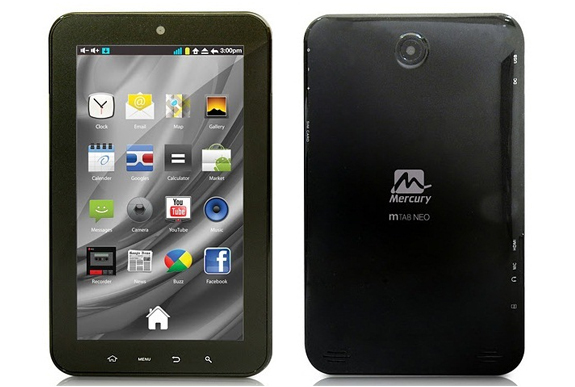
Mercury mTab Rio Specs, Pros and Cons

Intro :-

It has got a 10-inch buttonless screen, sturdy fabrication and aesthetic build. The Mercury mTab Rio looks and feels more expensive than it is. If you're looking for a budget tablet to read books, play games, watch movies and browse the web all in the confines of your Wi-Fi enabled home or office, then you gotta chose this one.

Pros

1. The squarish screen of the Mercury is absolutely superb with an aspect ratio 4:3. Reading books and watching movies is a good and pleasurable experience. You will not realize the slight saturation of colors unless it is placed to expensive tabs but that is not enough to spoil you experience. Rio's display is quite comparable to that of iPad 2.

2. The tablets slim profile and the rubberized finish on its back give it a premium feel. The buttons feel firm and respond with a healthy click. Gotta say now, its got a great bold quality.


3. Slates with large screens usually have low battery back-up but Rio has a good battery back-up.

Cons
 
1. Most of the tabs comes with a standard USB port but, unfortunately,  Rio has not got one. Unlike other Android slates, you cannot connect a pen drive or a memory card reader to this device.

2. No SIM card slot for 3G and no USB port to connect a data card or any other device for a 3G dongle. Apart form Wi-Fi, there is no way you can go online.

3. The IPS screen is a fingerprint magnet

Specs

- 9.7 inch IPS capacitive touchscreen (1024x768 pixels)
- 1.2GHz dual-core processor
- 1 GB RAM
- 4 GB internal memory, microSD slot
- Wi-Fi
- micro USB, mini HDMI ports
- 2 Megapixel rear camera and VGA front camera
- 8000mAh battery, over 8.5 hours video playback, over 1.5 days of heavy usage
- 480gms
- Android 4.0 Ice Cream Sandwich
Read More »
 

© 2011. All Rights Reserved | Blogger Tricks 'N' Gadgets | Template by Blogger Widgets

Home | About | Top ▲